Manage Storage on the GKD Pixel 2
ZyperOS Storage shows what fills the card and how much space each game uses. It also lists music, videos and audiobooks. Open it from the home screen at MENU > System > Storage.
On this page
These steps cover ZyperOS 1.0.5. Check your version in MENU > About.
Read the storage bar
The top shows used space and free space. The colored bar divides the card into six parts. The first scan measures the files; later visits show stored sizes while the scan updates them.
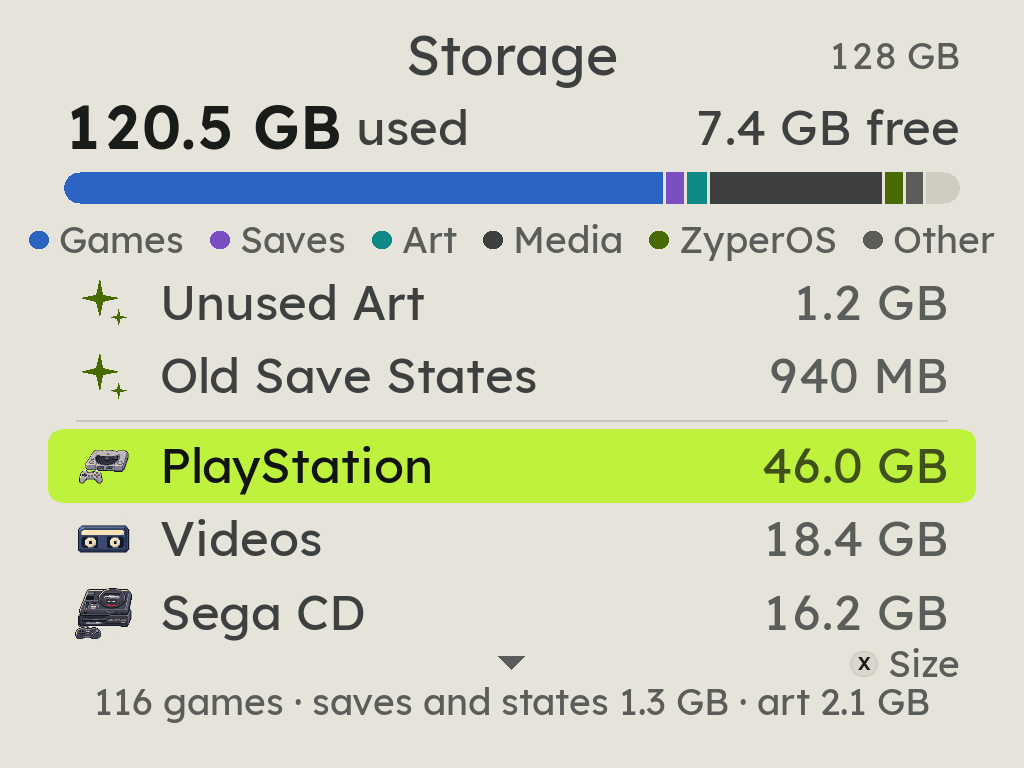
| Part | Contents |
|---|---|
| Games | Game files, without their artwork |
| Saves | Game saves and save states |
| Art | Covers and video previews |
| Media | Music, videos, audiobooks and menu music |
| ZyperOS | ZyperOS and emulator files |
| Other | BIOS files, settings and other card data |
Find large games or media
- Select a system and press A.
- Check each game's size and the details below the list.
- Press X to change the order.
- Press B to return to the card list.
Size puts the largest first. A to Z sorts by name. Last Played puts recent games first. Each list remembers its order.
Open Music, Videos or Audiobooks to inspect albums, films and books. These lists offer Size and A to Z. They have no Last Played order.
Remove unused art or old states
Storage shows cleanup choices when they can recover at least 10 MB.
- Unused Art removes covers and video previews for games no longer on the shelf.
- Old Save States removes a game's states only when no state changed and no play occurred for a year.
This also includes old states for games no longer on the card. Old Save States keeps game saves. It removes the separate emulator states. A system's Delete Video Snaps removes its video previews while keeping its games.
Delete a game, album or video
Back up files you want to keep before deletion. Use the File Transfer page, or copy them with a card reader.
- Select the item in Storage and press A.
- Read the name, size and deletion message.
- Choose Delete only if you want to remove that item.
The question starts on Cancel. B also cancels. Deletion cannot be undone.
Delete Game removes its files, saves, states, cover and video preview. It also removes local details and play-time records. Files that another game still uses stay.
An album or book folder goes with its contents. A video series folder goes with its videos. The displayed size helps you compare choices before deletion.