Music, Audiobooks and Videos on the GKD Pixel 2
The GKD Pixel 2 has a good screen, a speaker, a headphone jack and room for a big card, so it makes a handy music and video player too. ZyperOS has one built in, called MP4, for music, audiobooks and videos. SELECT opens it from anywhere, even from a paused game. This guide shows where files go, which ones play well, and the controls.
On this page
Where files go
| What | Folder | Example |
|---|---|---|
| Music | Music/, a folder per artist, one per album | Music/Radiohead/The Bends/01 Planet Telex.mp3 |
| Audiobooks | Audiobooks/, a folder per book, an author's folder above it if you like | Audiobooks/Iain M. Banks/The Hydrogen Sonata/ |
| Videos | Videos/, a film on its own or a folder per series | Videos/Planet Earth/01 From Pole to Pole.mp4 |
Send them as you send games: with the card in a computer, or on the File Transfer page over Wi-Fi or the USB cable. The adding games guide shows how.
- An album folder put straight into
Music/moves under its artist when its tags name one. Songs in no folder at all move intoMusic/Singles/. - A book is one M4B file or a folder of MP3s, played in name order.
- A picture named like a film,
Where the Light Is.jpg, is its cover. Otherwise MP4 takes one from the video itself.
Formats that play
Music and books: MP3, M4A, M4B, MP4, AAC, FLAC, Ogg, Opus and WAV.
Video is where the Pixel 2 needs care. It has no hardware video decoder its Linux can use, so its four CPU cores decode in software:
| Video | On the Pixel 2 |
|---|---|
| H.264 in an .mp4, up to 720p | Plays smoothly |
| H.264 at 854x480 or 640x360 | The size to make for its 640x480 screen, at a fraction of the battery |
| HEVC and VP9 | Play up to about 480p |
| 1080p | Only just keeps up, and drops frames when the picture moves a lot |
| AV1 | Does not play |
MKV, WebM, MOV and AVI files play too, if the video inside them is one of those. For a long trip, convert films to H.264 at 854x480: they look as sharp on this screen and the battery lasts much longer.
The shelf and Now Playing
MP4 opens on a shelf of album covers, the way a console opens on its games. MENU > Show switches between music, books and videos. A on an album opens its tracks; A on a book carries on where you left it.
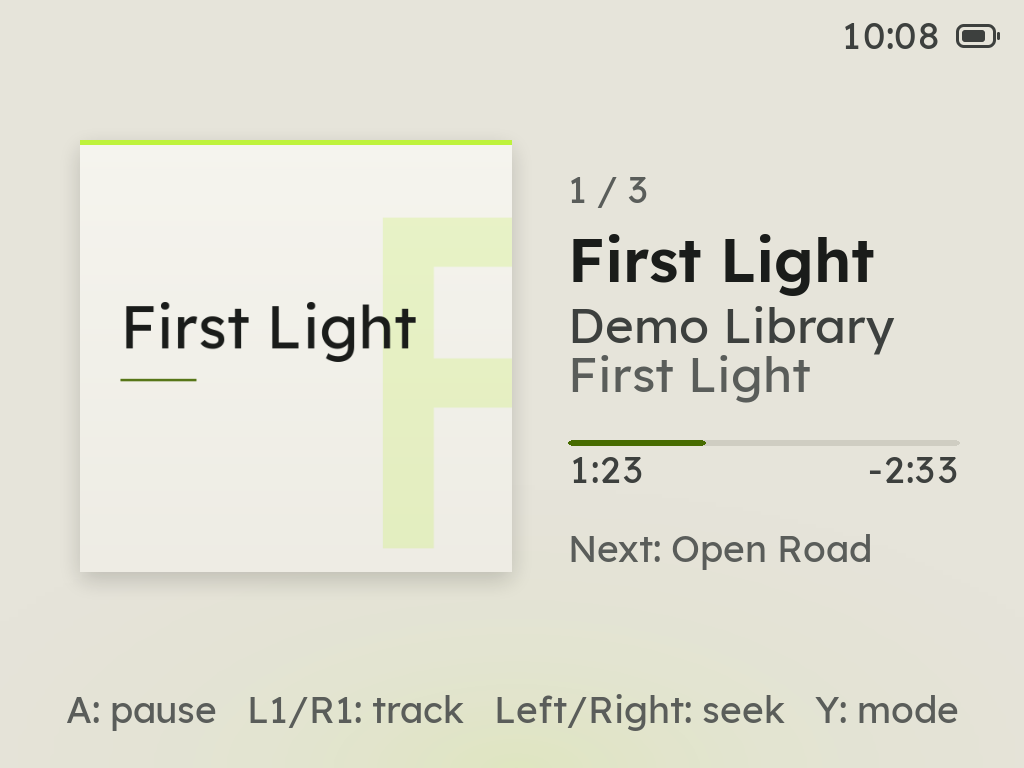
| Button | On Now Playing |
|---|---|
| A | Pause or play |
| L1 / R1 | The previous or next track, or a book's chapter |
| Left / Right | Back or ahead ten seconds; held, a minute a step, then five |
| Y | The play mode for music; the speed for a book, 0.75x to 2x |
| SELECT | Close MP4; the music keeps playing |
Leave MP4 and the music goes on behind the menus. On the home and a games shelf, L2 and R2 then skip tracks, and Zyper pops up with what plays now. While music plays, a running game is silent; pause the music and the game is heard again.
On a video, Y switches between full screen, where the controls show only when you press a button, and a view with the controls always on screen. Every video and every book remembers where you stopped, even through a power-off.
Lock the screen for a pocket
Press X on any MP4 screen while something plays. With music or a book the screen goes dark, and every button is ignored except the volume keys. On a book, that took about 6 hours of listening to 10. A video stays in sight. Hold SELECT and START together for two seconds to unlock.
Covers
An album's cover comes from its own files, or a picture in its folder. For albums with none, or only a small one, MENU > Album Art on MP4's shelf fetches a sharper cover over Wi-Fi from MusicBrainz's Cover Art Archive. It needs a USB Wi-Fi adapter on the Pixel 2.
Headphones
Wired headphones in the jack, or a USB-C headphone adapter in the port, take the sound the moment they are plugged in. The Pixel 2 has no Bluetooth, so Bluetooth headphones do not work on it.
Sources
- ZyperOS README, FAQ: adding music, audiobooks and videos, the video formats on the Pixel 2, Bluetooth.
- The ZyperOS user guide, MP4 and Audio: the shelf, Now Playing, Lock Screen, Album Art, where sound goes.