GKD Pixel 2 Battery: Charge Limit and Low-Battery Care
A handheld that lives on a desk charger sits at 100% for days, and a lithium battery ages faster when it is kept full. ZyperOS can stop the GKD Pixel 2's charge short, shows the charge while the handheld is off, and warns you before a low battery or heat gets in the way. This guide shows each one, and what the Pixel 2 does on its own.
On this page
The short answer
- MENU > Charge Limit stops charging at 80, 85 or 90%. It is Off on a new card.
- A charger plugged into a Pixel 2 that is off shows the charge, the charging speed and the time to full. Hold POWER to start.
- The battery mark turns red at 10%, and below 10% the bottom side light flashes red. At 2% off the charger, ZyperOS saves the game and turns the handheld off.
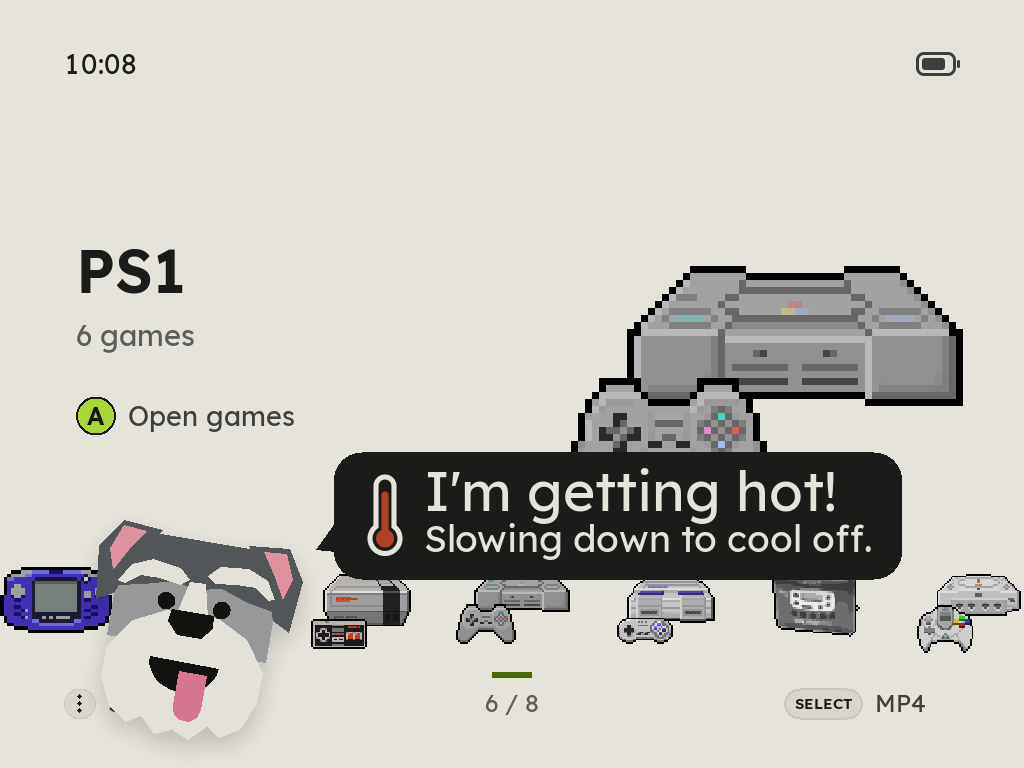
- When the chip gets hot enough for the kernel to slow it down hard, Zyper says "I'm getting hot!" so a slower game is no mystery.
Set a charge limit
Open MENU on the home screen and go to Charge Limit, under Auto Off. Left and Right step it through Off, 80%, 85% and 90%. The choice is saved at once.
At the limit, the Pixel 2 does not cut the cable off. ZyperOS's Linux, plastron, tells the Pixel 2's charger chip to let the cable give only 80 mA, which is less than the handheld uses. So the battery takes no more charge and slowly gives a little back, and 2 points under the limit it charges again: at 80% it stays between 78 and 80%. The handheld never runs without the cable's power while it is plugged in, and the battery does not sit topped up all day on a desk.
The percentage stays honest: 100% still means a full battery, and a limit of 85% shows 85%. The kernel forgets the limit when the handheld powers off, so ZyperOS sets it again at every start.
Need a full charge for a trip? On the charging screen, with a limit set, hold A. That charge goes to 100%, and the limit is back as soon as the cable comes out.
The charging screen while it is off
Plug a charger into a Pixel 2 that is off and it wakes to a quiet screen instead of staying dark. Zyper sleeps over the numbers:
- The charge, with the battery mark.
- The speed and the charger, for example Charging · 7.4 W · wall charger, or computer on a computer's port. It waits a few seconds until the USB port names the charger.
- The time to full, rounded up to 5 minutes, such as Full in about 1 h 10 min. With a charge limit it is the time to the limit, and then Kept at 85%.
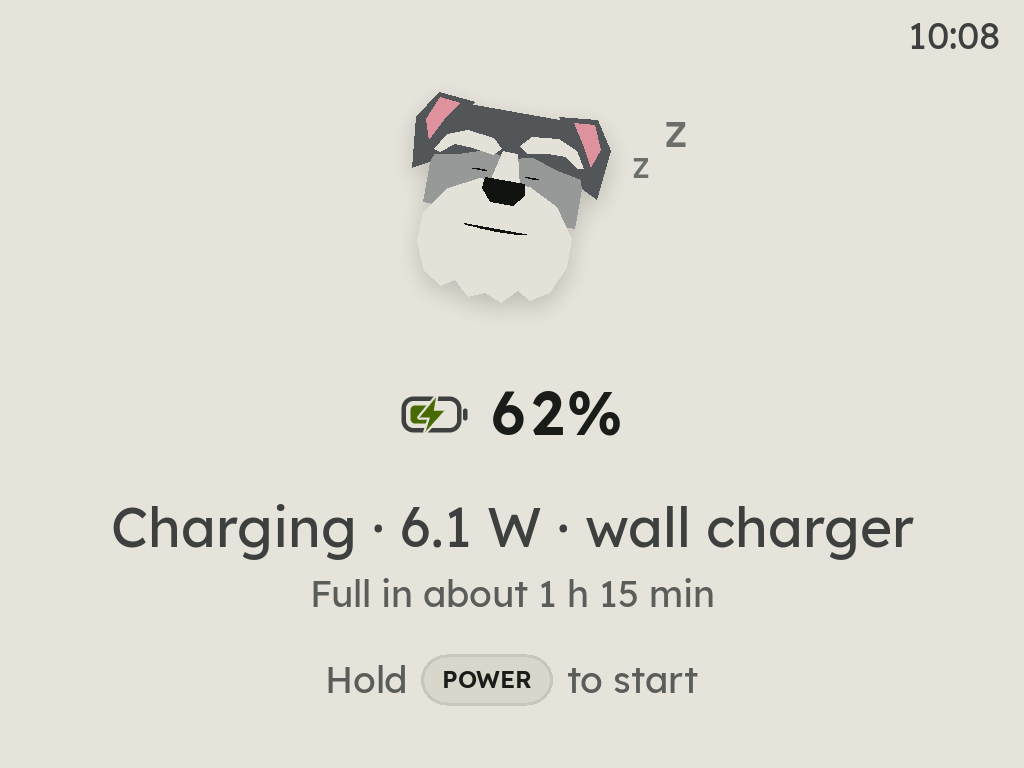
The screen goes dark after about ten seconds, and the side lights keep showing the charge. Any button lights it again. Hold POWER to start ZyperOS. Unplug the cable and it says Unplugged and turns off.
Turning the handheld off while it is on a charger goes to this screen too, after the game is saved.
Low battery
The battery mark in the top right corner of the home turns red at 10%, and its fill blinks at 5%. MENU > Battery Icon can show the percentage or the time left beside it.
The Pixel 2's four side lights warn you even in a game: below 10% the bottom light flashes red every five seconds, and below 5% twice every two seconds. Press L2 and R2 together outside a game to flash the level on all four lights.
At 2% or less off the charger, ZyperOS saves the game and powers off in order, before the battery cuts out on its own and loses your progress. Over a PortMaster port, it ends the port first. A start at 2% or less shows Battery too low and Plug in a charger instead of the home. Plug one in while it shows and the start goes on.
Heat
The Pixel 2's kernel slows the CPU and the GPU down when the chip passes 70 °C, and harder at 85 °C, where a game gets visibly slower. It powers the handheld off at 115 °C.
ZyperOS reads the chip's temperature every five seconds. After two readings in a row at 85 °C or more, Zyper pops up on the home with I'm getting hot! Slowing down to cool off. In a game it is a short notice with a thermometer. It says it again only after the chip has been under 80 °C, and never twice in five minutes. If the chip ever reaches 115 °C, the game is saved before the power goes.
Check the battery's health
MENU > About ZyperOS has a second page, with Right: the battery's estimated health, its full-charge capacity and its design capacity, in mAh. Health is the battery controller's own full-charge figure divided by the design figure. It is an estimate, not a lab test, but it shows a trend over months.
Other ways to make a charge last
- Lower clocks for light systems. ZyperOS runs 8-bit and handheld systems at lower clocks, measured to keep every frame, so they use less power. There is nothing to set.
- Auto Off in MENU powers the handheld down after a time with no button pressed. On a new card it is two minutes. On the charger it does not power down.
- Brightness: hold MENU and press the volume keys.
Sources
- ZyperOS README, Features and the user guide, Controls and menus: side lights, Auto Off, About ZyperOS, the battery mark.
- DESIGN.md, sections 11.23 to 11.26: Getting hot, a battery too low to start, charging while off, and the charge limit.
- src/main.c: the charge limit's steps (Off, 80, 85, 90) and a full charge, this time.